A deep dive into Alpine.js x-teleport
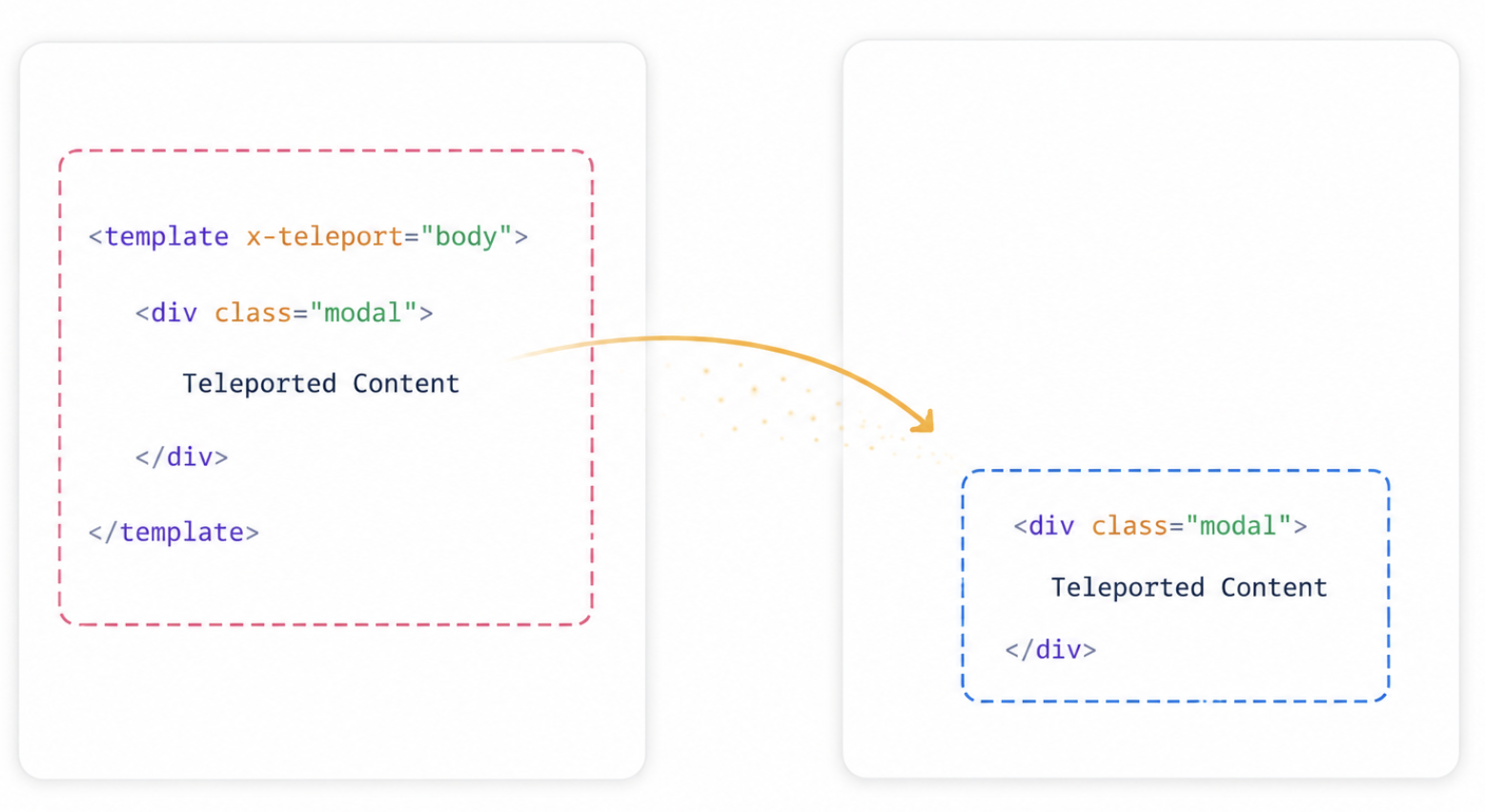
If you have used React portals or Vue’s <Teleport>, Alpine’s x-teleport solves the same category of DOM-placement problems using a declarative directive.
Why x-teleport exists
x-teleport renders Alpine markup in a different part of the DOM from where it is authored. The directive is placed on a <template> element. The selector value can be any string accepted by document.querySelector: a tag name, class, or ID.
Modals and dialogs
A modal needs to overlay the entire viewport. If it lives inside a component with position: relative or overflow: hidden, it cannot escape that box visually.
Overflow can clip descendants, while transform, opacity, positioning plus z-index, etc. can create stacking context. Descendant elements become visually constrained by that parent’s stacking context.
This produces a notorious category of bugs.
When Alpine initialises this component, the contents of the <template> are appended as a child of <body>. Reactive state and Alpine features continue working as if the markup never moved.
The same issue applies to z-index layering for modals. A modal nested deep inside a component tree may still appear beneath sibling elements, regardless of its z-index, because stacking only works within the same stacking context.
Tooltips and popovers
JavaScript-positioned tooltips often fail inside scrollable containers or transformed parents. Teleporting gives them an unconstrained root to position against.
Avoid teleport for content that does not need to escape a stacking context or reposition in the DOM. Overusing it makes the DOM structure harder to reason about in DevTools, and you lose the visual co-location that makes Alpine’s declarative style so readable.
Native DOM events bubble up the actual DOM tree, not the logical component tree. Because teleported content physically lives elsewhere in the document, a click event originating inside a moved element will bubble through body, not through your Alpine component.
Alpine solves this with automatic event forwarding. You register listeners directly on the <template x-teleport> element, and Alpine forwards events by re-dispatching them from the <template> so listeners there can behave as if the content were still in place.
This mechanism is mostly transparent, but it is worth knowing when you add third-party libraries that rely on event propagation paths. Those libraries may not see events that Alpine has re-dispatched.
Performance impact
x-teleport mainly affects DOM placement, not Alpine’s reactivity system. It changes visual placement, not accessibility responsibilities. Modals still require proper focus management, keyboard handling, and ARIA semantics.
On initialisation, Alpine performs a one-time DOM move that may trigger layout recalculation;
Event forwarding introduces minor overhead because forwarded events are cloned and re-dispatched. The DOM nodes themselves are still moved, not duplicated;
DevTools display teleported elements at their relocated position, which can make debugging harder;
Reactivity performance is effectively unchanged compared to non-teleported Alpine components.
---
config:
  layout: elk
---
flowchart TB
    C["<b>Full-screen Overlays</b><br/>Modals, lightboxes,<br/>drawer panels"]
    D["<b>Floating UI Elements</b><br/>Tooltips, dropdowns,<br/>context menus"]
    F["<b>Portal-style Panels</b><br/>Tab content, sidebar<br/>content"]
    E["<b>Global Notifications</b><br/>Toast systems, alerts"]

    G["x-teleport can be used"]

    C --> G
    D --> G
    F --> G
    E --> G

    style C stroke:#2dd4bf,fill:#f0fdfa
    style D stroke:#2dd4bf,fill:#f0fdfa
    style F stroke:#2dd4bf,fill:#f0fdfa
    style E stroke:#2dd4bf,fill:#f0fdfa

    style G stroke:#4ade80,fill:#f0fdf4,stroke-width:2px
Combining x-teleport with x-if for memory management
The most performance-conscious pattern pairs the two directives. Usually the pattern is a <template x-teleport="..."> containing another <template x-if="..."> to conditionally destroy the content when it is not needed. This means the modal’s DOM, event listeners and Alpine data are removed from the DOM and eligible for collection once no references remain.
Combining x-teleport with x-if enables a lazy-load pattern. Content is authored near its controlling tab, rendered to a shared panel area, and destroyed from the DOM entirely when the tab is inactive.
This trades the immediate mount cost (re-initialising the component on open) for a lower sustained memory footprint. For modals that are rarely used, it is the right default. For modals that open frequently, prefer x-show inside the x-teleport to avoid repeated initialisation cost.
x-teleport solves escaping CSS stacking contexts without requiring you to restructure your Alpine component logic. It keeps state, reactivity, and event handling with the component that owns them, while giving the browser freedom to paint the output wherever the layout demands.
When used sparingly, the runtime cost of x-teleport is usually negligible. The main trade-off is cognitive: teleported elements live in two conceptual places at once.
If an overlay or floating element is being clipped, z-index is failing, or a nested modal is fighting its parent stacking context, reach for x-teleport.